Server-side tracking and consent
Server-side tracking sends measurement events from your own server to analytics and ad platforms instead of from the visitor's browser, which gives you control over what leaves your site but leaves consent duties where they were.
Server-side tracking is a setup where the browser sends events to a server you control, and that server forwards them to analytics and ad platforms such as Google Analytics or Meta. It gives more control over what is shared and can make cookies last longer in Safari. It does not remove the duty to get consent where EU or UK law requires it.
- Origin
- Practice, formalised by Google (server-side Tag Manager) and Meta (Conversions API), 2020s
- Level
- 301 · Advanced
- Fits
- Small and mid-size, Scale-up
- Time to apply
- A few days to stand up a server container and one platform; weeks to validate against existing numbers
- What you need
- a consent banner that records choices and can pass them to your tags · an event list agreed in advance, such as an event tracking plan · a developer who can host a server and change DNS for a subdomain · someone accountable for privacy decisions, in-house or external
Server-side tracking is a way of measuring visitors in which the browser sends events to a server you control, and that server passes them on to analytics and ad platforms. Google describes its version, server-side tagging in Tag Manager, as a way to instrument tags to measure user activity wherever it happens, and lists three promised gains: page performance, finer privacy controls and data quality. Meta’s equivalent, the Conversions API, sends events from a company’s servers to Meta, where they are processed like events from the Meta Pixel. No single inventor exists. It grew out of browser restrictions on third-party scripts and cookies, and the vendors turned the workaround into products.
This page covers what it changes, what it leaves alone, and the one point teams most often get wrong: it does not replace consent.
What a server in the middle does
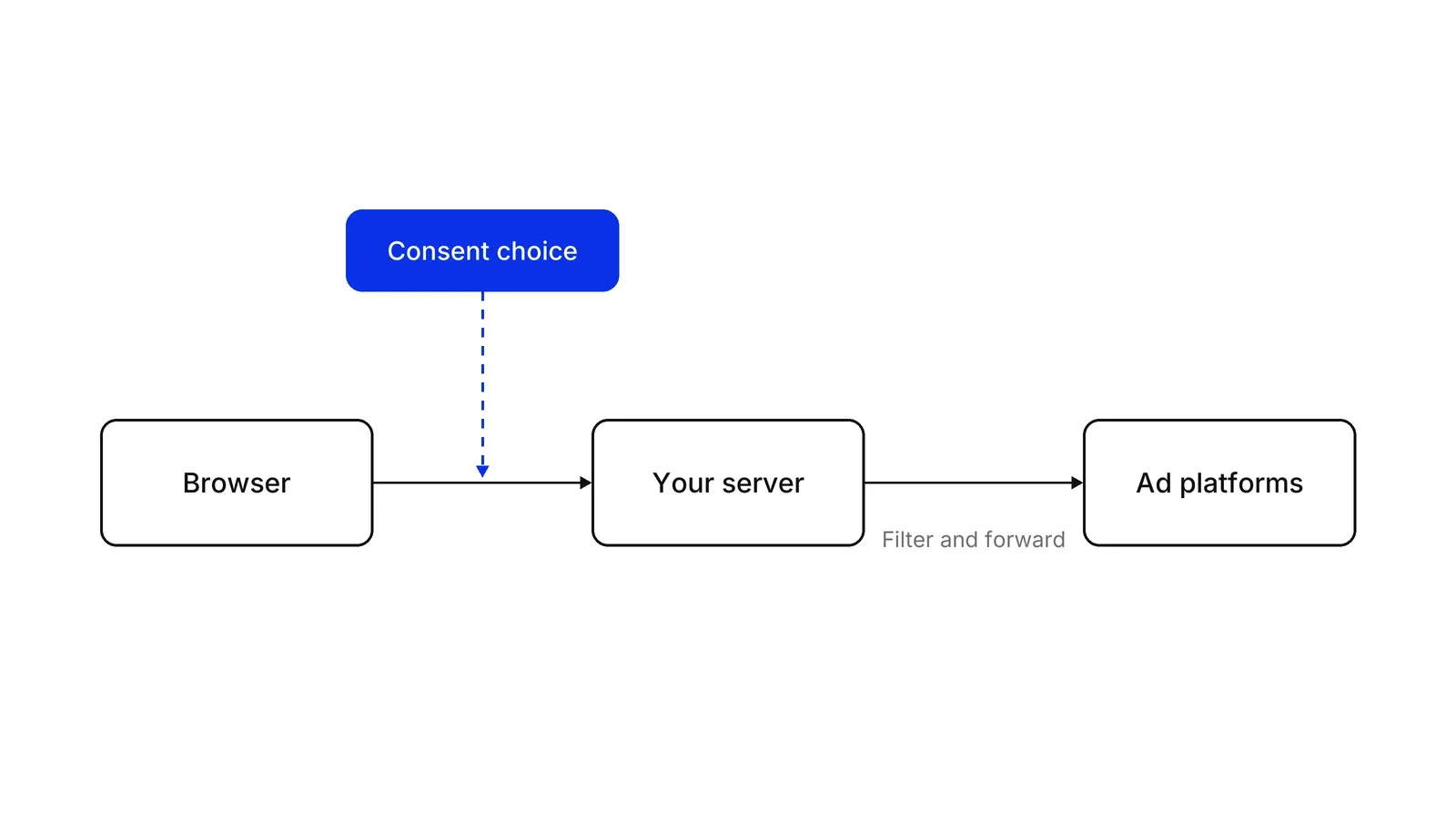
A server container receives each request from the visitor’s device, turns it into an event, and lets tags decide what to forward. Google’s introduction says the container runs on a server you control and recommends serving it from your own domain before production traffic. Its fundamentals course calls the server “a buffer between the user and the vendors”. You can drop fields, hide an IP address or add data the browser should never hold, such as an API secret, before anything leaves.
The picture also explains the main trap. The server can only forward what the browser sent it, and what the browser was allowed to send is a consent question.
What it fixes in Safari
A cookie set by your own server, on your own domain, escapes some of Safari’s age limits. Apple’s Intelligent Tracking Prevention (ITP) applies them, and WebKit’s tracking prevention policy caps cookies created by JavaScript and deletes script-writable storage after 7 days without user interaction, and sets a 24-hour limit when a click ID in the landing URL is stored by script. It also caps cookies from third-party CNAME or IP-address cloaking at 7 days, and says first-party cloaking is not capped. Safari has blocked all third-party cookies by default since 24 March 2020, starting with Safari 13.1 on macOS and iOS 13.4 on iPhone and iPad.
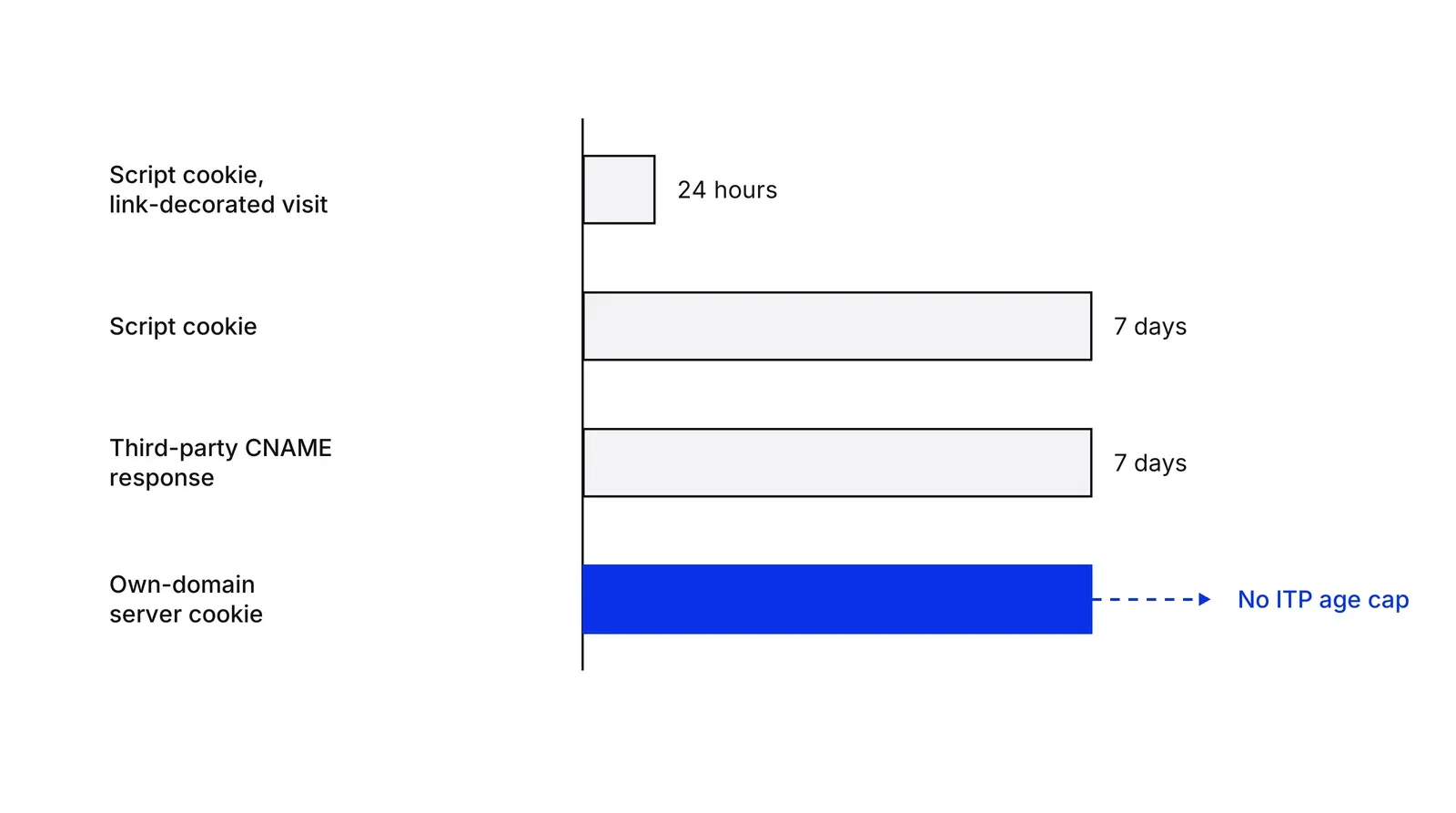
Setup details decide the result. Google’s custom domain guide says a same-origin path or a subdomain gets server-set cookies, while the default run.app address “can only set Javascript cookies”. The WebKit CNAME post of 12 November 2020, by John Wilander, shows that a subdomain pointing at a different host can be treated as cloaking. Longer cookie life also raises the stakes for consent, because a longer-lived identifier is still an identifier.
Chrome is a different case. MDN lists Safari and Firefox as blocking third-party cookies by default, Firefox through Total Cookie Protection, and Google Chrome as not, and Google said in October 2025 that Chrome keeps its current approach of letting users choose.
What it does not change: consent
Consent is required where the law says so, no matter where the forwarding happens. Article 5(3) of the ePrivacy Directive 2002/58/EC, as amended by Directive 2009/136/EC and read in its consolidated text, allows storing or reading information on a user’s device only with the user’s consent, given after clear information, unless the access is strictly necessary for a service the user asked for. The EDPB’s 2023 guidelines go further for our case: when client-side code sends locally held information back to a server, that is a gaining of access to information already stored (paragraph 53), and tracking pixels fall under the same rule (paragraph 51).
The GDPR adds its own conditions. Consent must be a freely given, specific, informed and unambiguous indication (Article 4(11)), the controller must be able to show it was given (Article 7(1)), and withdrawing must be as easy as giving it (Article 7(3)). The EDPB’s Guidelines 05/2020 on consent state in Example 16 that scrolling or swiping is not consent, and the Court of Justice ruled in Planet49 (Case C-673/17) that a pre-ticked box is not valid consent. This is a summary of public texts, not legal advice for your product.
The platforms say the same. Google’s server-side consent guide puts consent mode in the Google Tag Manager web container, which passes the visitor’s preferences to the server container as parameters on each request. The server container needs the Conversion Linker tag for Google Ads Conversions and Floodlight tags. Google’s consent mode guide notes that consent mode needs a banner from another tool. Google’s EU User Consent Policy extends the duty to the United Kingdom and Switzerland and asks for records of consent. Meta’s Business Tools Terms make the advertiser responsible for obtaining the consent that applies, in a verifiable way.
Consent mode v2 and the March 2024 date
Consent Mode v2 added two signals to the original pair: ad_user_data, consent to send user data to Google for advertising, and ad_personalization, consent for personalised ads. Google’s EEA help page says advertisers using Google Ads and Google Analytics must collect consent from users in the European Economic Area and share the signals to use personalisation and measurement features. Google’s own pages date the change in two places: its consent guide says the update came in November 2023, and its Obtain user consent page lists Customer Match, store sales uploads and Ads Data Hub as needing consent signals starting March 2024. The Commission confirms that Alphabet and the other five designated gatekeepers had to meet all Digital Markets Act obligations from 7 March 2024. We found no Google page that gives one enforcement date for consent mode as a whole, so we state the dated parts only.
Meta’s Conversions API
Sending the same event from the browser and from the server counts it twice unless Meta can match the pair. Meta’s deduplication rules match on event ID and event name, and apply within 48 hours of the first event received. The customer information parameters require email and phone to be normalised and hashed, while IP address and user agent must not be hashed. Each event needs an event name, an event time, an action source and user data, and can be backdated up to 7 days, according to the API guide.
Client-side, server-side or both
| Browser only | Server only | Hybrid | |
|---|---|---|---|
| Where tags run | Visitor’s device | Your server | Both |
| Control over fields | Low | High | Medium |
| Cookie durability in Safari | Capped | Longer if set by first-party server | Mixed |
| Running cost | None beyond tags | Hosting and upkeep | Hosting and upkeep |
| Consent duty | Yes | Yes | Yes |
Cost is real. Google’s Cloud Run guide recommends at least 2 instances and puts each at about $45 a month, which comes to roughly $90 a month before any traffic growth. The same guide expects 2 to 10 autoscaled servers to handle 35 to 350 requests per second, and suggests turning off request logging above about 1 million requests a month. Pair the setup with an event tracking plan so the server forwards a defined set of events. A customer data platform covers the wider job of unifying profiles, and end-to-end analytics shows where these events end up. Whatever server setup you choose, attribution models still decide how the numbers are credited.
A note for Russian readers
Russian law has its own rules, separate from the EU. The text of 152-FZ on ConsultantPlus describes consent as specific, informed and unambiguous, requires it to be drawn up separately from other documents the person signs, and puts the burden of proving it on the operator. Article 18 part 5 bars collecting Russian citizens’ personal data with databases located outside Russia, with listed exceptions, so the location of a tagging server is a legal question as well as a technical one. Ask a Russian lawyer before relying on this summary. A Growth Lab plan starts from the consent and data flows you already have, as set out in our practice description.
How to apply Server-side tracking and consent, step by step
- Settle consent first. Check that your banner stores the visitor's choice, lets them change it, and keeps a record you can show. Fix this before moving any tag, because a server will faithfully forward events that should never have been collected. The result is a consent state every tag can read.
- Pick the events and platforms. List the few events that feed decisions, such as a purchase or a booking request, and the platforms that need them. Start with one platform. The result is a short scope you can test end to end.
- Stand up the server container on your own domain. Deploy a Google Tag Manager server container on Google Cloud Run and map a subdomain or path of your site to it. The result is a first-party endpoint that can set server cookies.
- Pass the consent signal with every request. Configure the Google tag so each request to the server carries the visitor's consent state, and make the server tags read it. The result is that denied choices stop or reduce what is forwarded.
- Add platform-side events with deduplication. For Meta Pixel and Conversions API, send the same event from browser and server with a shared event ID and name, and hash email and phone before sending. The result is one counted conversion instead of two.
- Compare against the old setup, then retire the old tags. Run old and new side by side, compare event counts by day and consent state, and remove duplicate browser tags only once the gap is explained. The result is a documented switch, not a silent change in your numbers.
Examples
A dental clinic's booking form
Illustrative. A clinic moves its booking-confirmed event to a server container. Visitors who accept marketing cookies produce an event forwarded to Google Analytics 4 and Meta. Visitors who decline produce no ad event at all, and the clinic checks that by comparing counts in both groups.
A fintech's signup funnel
Illustrative. A payments app wants to keep account numbers and internal user IDs out of the browser. It sends a plain event to its Google Tag Manager server container, which strips fields the ad platforms should not receive, hashes the email and forwards the result only for users who agreed.
When to use it
Use it when you spend real money on Google Ads or Meta in Safari-heavy markets, when you want one place to filter fields before they reach vendors, or when browser scripts slow your pages. It pays off once a consent process and an event plan already exist.
When not to use it
Skip it while you have no consent process, no agreed event list, or no one to run a server. A small site with a few thousand monthly visitors gains little against the hosting and maintenance work, and a plain browser setup with proper consent is the safer start.
Common mistakes
- Treating the server as a way around the banner, then forwarding events for visitors who declined.
- Counting the same conversion twice by sending Meta Pixel and Conversions API events without a shared event ID.
- Sending unhashed email or phone numbers to an ad platform that requires hashing.
- Leaving the default Cloud Run domain (run.app) in place, which can only set JavaScript cookies, and expecting longer cookie life.
- Switching off the old tags on day one, so a drop in numbers cannot be traced to its cause.
FAQ
Does server-side tracking need cookie consent?
Where EU or UK rules require consent for the cookies or device access behind a measurement, moving the forwarding to a server does not change that. The EDPB treats client-side code that sends information to a server as gaining access to the device. Whether a given tag is exempt is decided case by case.
Is server-side tracking GDPR compliant?
It is a technical setup, so compliance depends on how you use it: legal basis, consent where required, notice, data minimisation and processor contracts all still apply. The server gives you a place to enforce those choices, such as dropping fields, but it does not supply any of them.
Does server-side tracking fix Safari and ITP?
Partly. Apple's WebKit caps the age of script-written cookies at 7 days, and cookies from third-party CNAME-cloaked responses too. A cookie set by a genuine first-party server response is not capped by those rules, so identifiers can last longer, subject to consent.
Do I still need a CMP with Google Tag Manager server-side?
Yes. Google states that consent mode does not provide a banner. You need a consent solution that collects the choice and passes it to the Google tag in the web container, which forwards it to the server container.
What is the difference between Meta Pixel and Conversions API?
The Pixel runs in the visitor's browser. The Conversions API sends events from your server to Meta, where they are processed like Pixel events. Meta's documentation describes matching events by event ID and name within 48 hours so a conversion is counted once.
Sources
- Google, Server-side tagging overview, Tag Platform
- Google, An introduction to server-side tagging, Tag Platform
- Google, Why and when to use server-side tagging, Tag Platform
- Google, Send data to server-side tagging, Tag Platform
- Google, Use a custom domain, Tag Platform
- Google, Set up server-side tagging with Cloud Run, Tag Platform
- Google, Implement consent mode with server-side Tag Manager, Tag Platform
- Google, Set up consent mode on websites, Tag Platform
- Google Ads Help, Updates to consent mode for traffic in the European Economic Area
- Google Ads Help, Obtain user consent
- Google, EU user consent policy
- Meta for Developers, Conversions API overview
- Meta for Developers, Handling duplicate Pixel and Conversions API events
- Meta for Developers, Customer information parameters
- Meta for Developers, Using the Conversions API
- Meta, Business Tools Terms
- WebKit, Tracking Prevention
- WebKit blog, Full Third-Party Cookie Blocking and More
- WebKit blog, CNAME Cloaking and Bounce Tracking Defense
- MDN Web Docs, Third-party cookies
- Google Privacy Sandbox, Update on plans for Privacy Sandbox technologies
- European Parliament and Council, Directive 2002/58/EC (ePrivacy), consolidated text including the 2009 amendment, EUR-Lex
- European Parliament and Council, Regulation (EU) 2016/679 (GDPR), EUR-Lex
- European Data Protection Board, Guidelines 2/2023 on the Technical Scope of Article 5(3) of the ePrivacy Directive, v2.0
- European Data Protection Board, Guidelines 05/2020 on consent under Regulation 2016/679
- Court of Justice of the European Union, Planet49, Case C-673/17, EUR-Lex
- European Commission, Designated gatekeepers must now comply with all obligations under the Digital Markets Act
- Federal Law No. 152-FZ On Personal Data, Article 9, ConsultantPlus
- Federal Law No. 152-FZ On Personal Data, Article 18, ConsultantPlus
Last updated Oct 9, 2026


The compliance layer under fintech marketing operations
A fintech marketing agency can build campaigns. It cannot own the compliance review, the KYC drop-off or the multi-market licensing rules that decide whether a lead ever becomes a customer.

Fractional CMO: what you get, and what has to exist underneath
A fractional CMO brings strategy and judgment. Without reporting, CRM hygiene and a named owner per number, the engagement produces a slide deck instead of a system.

The operations layer behind healthcare patient acquisition
Ads and search bring the request in. What happens between the click and the booked, attended visit decides whether the spend paid off.