Topic clusters and pillar pages
A topic cluster is a group of interlinked pages on one subject: a broad pillar page and focused cluster pages that link to it and to each other, so readers and crawlers can see how the content fits together.
A topic cluster is a set of pages about one subject: a pillar page that covers the topic broadly, and cluster pages that each answer one narrower question in depth. Every cluster page links to the pillar and the pillar links back to each of them. The model, also called hub and spoke, organizes a site around topics instead of single keywords.
- Origin
- HubSpot research team (Anum Hussain and Cambria Davies per HubSpot; HubSpot Research per Content Marketing Institute), 2015 to 2017, sources differ
- Level
- 201 · Tool
- Fits
- Startup, Small and mid-size, Scale-up
- Time to apply
- half a day to plan a cluster, then 4 to 8 weeks to publish it
- What you need
- a list of the questions your buyers ask, from sales calls, support tickets and search data · keyword research for the topic, with query volumes · an inventory of your existing pages on the topic · one editor who owns the cluster and can change links on old pages
A topic cluster is a group of interlinked pages on one subject: a pillar page that gives a broad overview, and cluster pages that each cover one narrower question in depth. Everything links to everything it should: cluster pages to the pillar, the pillar to each cluster page. This page also covers “hub and spoke content”. It is the same model under another name, with the pillar as the hub and the cluster pages as the spokes. The HubSpot Marketing Blog says the topic cluster model is also called hub and spoke.
Where does the model come from?
The sources disagree on the date. The Content Marketing Institute says the method was first detailed by HubSpot Research in 2017. The HubSpot Marketing Blog credits a 2015 research project, “Topics Over Keywords”, by former HubSpot staff Anum Hussain and Cambria Davies. Both agree on the idea: treat a blog as a set of topics, each with a home page and supporting pages, not a feed of posts aimed at separate keywords.
The reasoning is that search moved from matching exact words to matching meaning. Google Search Central lists BERT, RankBrain and Neural Matching among its ranking systems, and describes them as ways to relate words to concepts so a page can rank without the exact terms in the query.
How does a topic cluster work?
A cluster has three parts, as HubSpot lists them: pillar content, cluster content and hyperlinks.
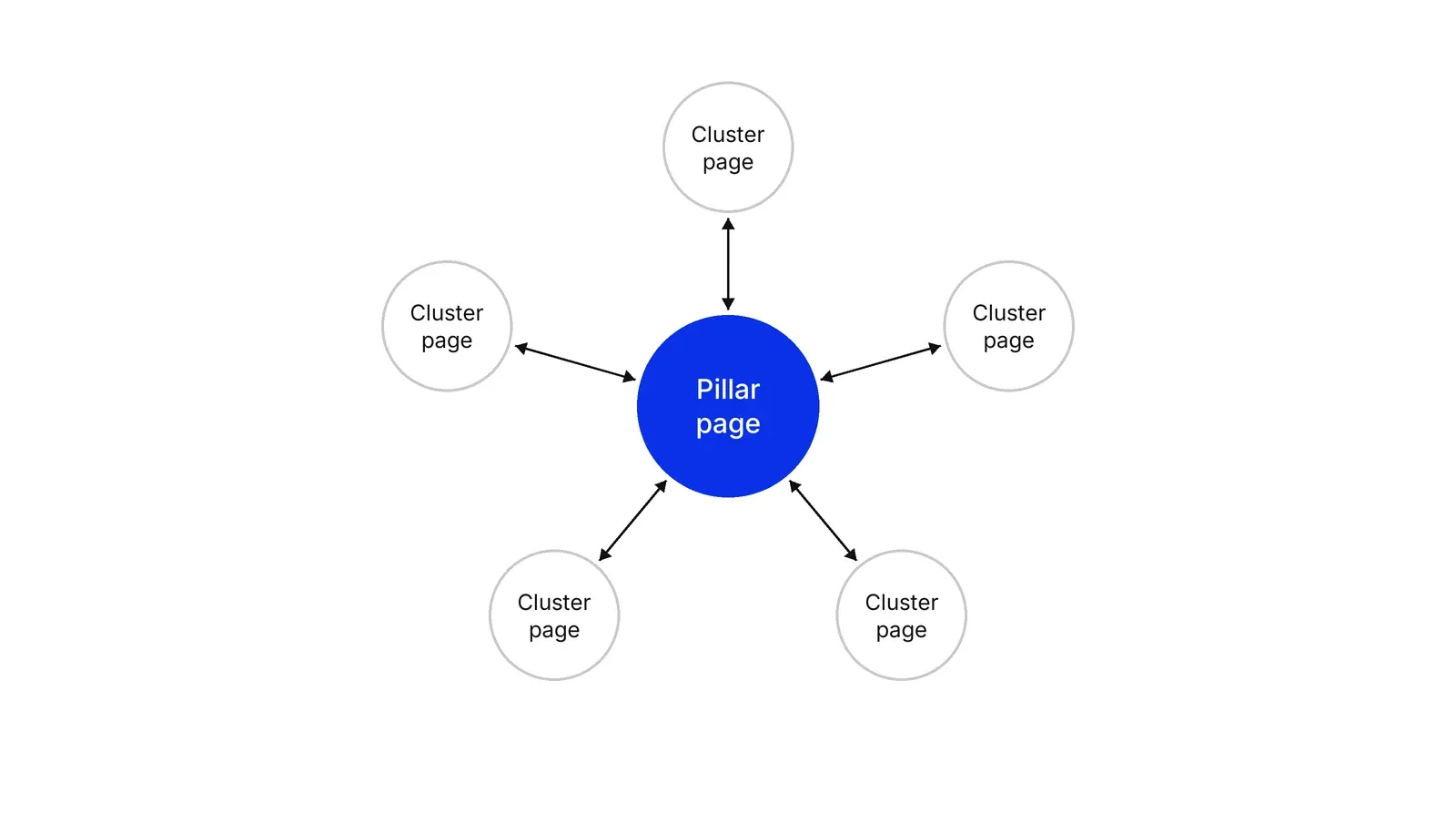
The pillar page covers the whole topic at overview level. The Content Marketing Institute describes pillars as “usually extremely long-form (3,000-plus words)” in its topic cluster article, while the HubSpot pillar page guide gives no word count. Length is not the test. The test is whether the page answers the common questions and sends the reader to the right cluster page. A cluster page takes one subtopic, usually one long-tail query, and goes deeper than the pillar can.
Take the dental clinic from the examples below. “Dental implants” is the pillar. “How long does implant healing take” is a cluster page. A reader who lands on either one can reach the other in one click.
What are the linking rules?
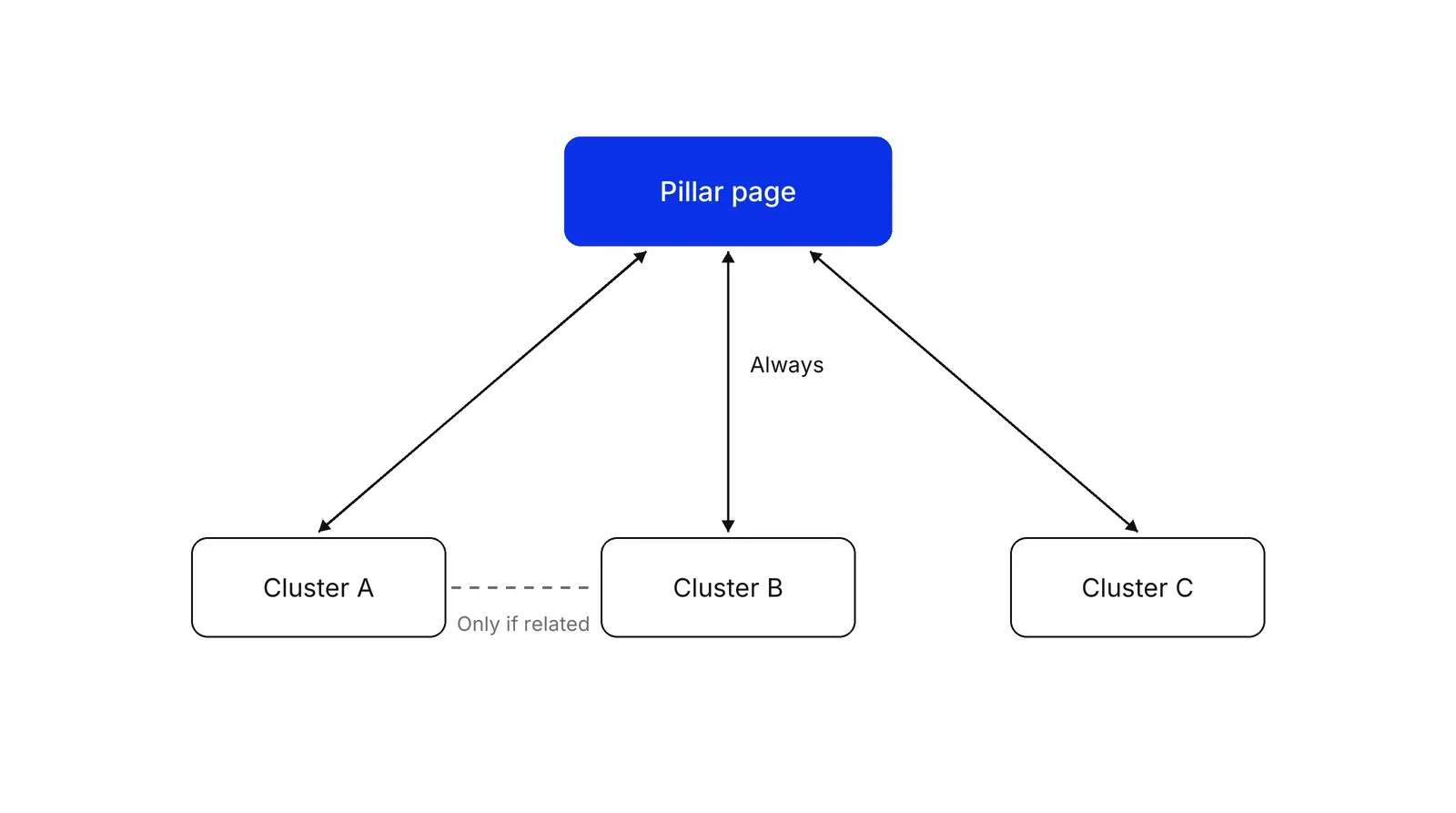
Every cluster page links to the pillar, and the pillar links to every important cluster page. Cluster pages link to each other only where the topics really overlap. The HubSpot Marketing Blog states the same three rules, and the HubSpot Knowledge Base adds that supporting content should link back to the pillar page. HubSpot’s tool allows up to 100 subtopic keywords per topic.
The Google Search Central page Link best practices for Google sets the technical floor. Links should be an anchor element with an href, or Google may not follow them. Anchor text should be descriptive, reasonably concise and relevant, and every page you care about should have a link from at least one other page. Putting links in context, where they help the reader, matters more than the count. Google Search Central also advises against chaining links next to each other. Raluca Budiu of Nielsen Norman Group made the reader’s side of the same point in 2020: people judge a link by its information scent, and “Learn more” gives them almost none.
Do topic clusters improve rankings?
Probably, through internal links, but the cluster format itself is not documented as a ranking factor. Anum Hussain and Cambria Davies reported at HubSpot in 2015 that adding internal links between related pages raised their SERP positions and impressions. It shows this on the HubSpot blog and publishes no figures. The Google Search Central ranking systems guide says Link Analysis Systems look at how pages link to each other to work out what pages are about, and that PageRank is still part of its core ranking systems. The 1998 paper by Sergey Brin and Lawrence Page, The anatomy of a large-scale hypertextual Web search engine, describes ranking by link structure.
The HubSpot Knowledge Base is careful on this: creating topic clusters in HubSpot does not affect your website’s SEO directly. Linking supporting content to the pillar is what helps search engines find it. Despina Gavoyannis of Ahrefs wrote in June 2026 that Google has never published a formal specification for topical authority, which is the usual name for the effect clusters aim at. Clusters are a sound way to organize links and content. The lift depends on the pages.
| Claim | Who made it | Year |
|---|---|---|
| Internal links between related pages raised SERP positions | Anum Hussain and Cambria Davies, HubSpot | 2015 |
| Pages can be ranked by link structure | Sergey Brin and Lawrence Page, Stanford University | 1998 |
| Hub pages point to authoritative pages | Jon Kleinberg, Cornell University | 1999 |
| Vague link labels give readers little scent | Raluca Budiu, Nielsen Norman Group | 2020 |
| No formal specification for topical authority | Despina Gavoyannis, Ahrefs | 2026 |
One note on words. In Jon Kleinberg’s 1999 paper in the Journal of the ACM, a “hub” is a page that points to many authoritative pages, a graph-theory idea that predates SEO use. In content strategy, the hub is simply your pillar page.
How big should a cluster be?
No study gives a number, so the figures below are practitioner guidance, listed with who said them.
| Question | Guidance | Who says it |
|---|---|---|
| Supporting articles per pillar | 20 to 30 | HubSpot Marketing Blog, 2026 |
| Articles to cover a niche | 15 to 20, with results in 6 to 12 months | Despina Gavoyannis, Ahrefs, June 2026 |
| Contextual links per article | 3 to 5 as a starting point | Chris Haines, Ahrefs, March 2026 |
| Clicks from the homepage to key pages | No more than 3 | Chris Haines, Ahrefs |
| Pillar length | 3,000 words or more, or no set length | Content Marketing Institute; HubSpot |
Start smaller than the guidance: 8 cluster pages that each answer a real question beat 30 written to hit a count.
Pillar page, cornerstone content, silo: how do they differ?
| Term | What it is | Link pattern |
|---|---|---|
| Topic cluster | Pillar plus cluster pages on one subject | Pillar and clusters link both ways; clusters cross-link when related |
| Cornerstone content | Yoast SEO’s name for your most important articles, which should rank highest | Related posts link back to the cornerstone; link to it from the homepage |
| Strict silo | A section of the site where pages link only within the section | Few or no links across sections |
| Topical authority | The result clusters aim for: search engines treating your site as an expert source | Not a structure; an outcome |
Chris Haines of Ahrefs recommends topic clusters over strict silos and key pages within three clicks of the homepage. Yoast describes cornerstone content in similar terms. A strict silo blocks links between related pages in different sections, and that is how cross-topic questions go unanswered.
What can go wrong?
The main risk is volume without value. Google Search Central sets that line in the Search Essentials spam policies. The Google spam policies define scaled content abuse as many pages created mainly to manipulate rankings, and Google’s guidance on generative AI content says that producing many pages that add nothing for users may violate that policy. A cluster of 40 thin pages is the pattern Google describes. A cluster of 10 pages that each carry original information, a named author and sources is what the people-first content guidance asks for.
AI answer features also lean on subtopics. Google Search Central says AI Overviews and AI Mode may use query fan-out, issuing several related searches across subtopics. A site with a page for each subtopic gives those systems more to pick from. In the 2026 Semrush Blog guide, Alex Lindley suggests measuring a cluster by organic traffic, click paths between its pages and the share of target keywords you rank for. Google adds there are no extra requirements to appear in them beyond being indexed and eligible for a snippet.
A Growth Lab plan starts from the 20 or 30 questions your buyers ask and turns them into a cluster map before any page is written (Growth Lab).
How to apply Topic clusters and pillar pages, step by step
- Pick a topic you can own. Choose a subject close to what you sell, broad enough to hold many questions and narrow enough to cover on one page. HubSpot's own example treats social media as too broad and Instagram captions as too narrow. Allow 60 minutes with 2 or 3 colleagues. Result: one named topic with a business reason behind it.
- Collect and group the questions. List every question and keyword around the topic, from Google Search Console queries, Semrush Keyword Magic Tool or Ahrefs Keywords Explorer, plus 10 recent sales calls. Then group the ones that share the same search intent. Similar keywords with one intent become one page, not several. Allow 2 to 3 hours. Result: a map of 8 to 20 subtopics, each with one primary keyword.
- Audit what you already have. Match existing pages to the subtopics, using the Google Search Console Performance report to see which already earn clicks. Pages that already rank become cluster pages and get new links. Overlapping pages get merged. Allow half a day. Result: a list of pages to keep, merge, rewrite or write from scratch.
- Write the pillar page. Cover the whole topic at overview level, answer the common questions briefly, and send readers to a cluster page wherever they would want more detail. Put it at a stable, high-level URL. Allow 3 to 5 days for writing and review. Result: one page that stands alone and points to every subtopic.
- Write the cluster pages. Each cluster page answers one narrow question in depth and does not repeat what another cluster page covers. Link to the pillar with clear anchor text. Plan 1 to 2 pages a week. Result: pages that each own one query and send readers upward.
- Wire the links and review. Add the pillar's links to every cluster page after publishing, link between cluster pages only where topics overlap, and run a crawler such as Screaming Frog SEO Spider to confirm no page in the cluster is orphaned. Review rankings and clicks in Google Search Console after 90 days. Result: a connected structure you can measure against a Google Search Console baseline taken before launch.
Examples
A dental clinic and implants
Illustrative. A clinic with 400 patients a month publishes one pillar, 'Dental implants', and 8 cluster pages. The pillar covers what implants are, who they suit and what the process looks like. Cluster pages answer single questions: how long healing takes, implants versus bridges, what a consultation includes, how financing works. Each cluster page links to the pillar and to the booking page. The clinic merges two old posts that both answered 'does an implant hurt' into one page, so the cluster has one answer per question.
A B2B payments startup
Illustrative. A startup selling to 50 to 200 person companies makes 'Cross-border payments for small businesses' the pillar, with 10 cluster pages. They cover payout speed, currency conversion fees, supplier onboarding checks, accounting integrations and licensing basics for each region. Because this touches money and regulation, each regulatory claim on a cluster page cites the regulator's own document, and one named compliance reviewer checks the pillar before it goes live.
When to use it
Use it when you already have 10 or more posts on a subject that buyers research before they buy, and your blog has become a pile of posts competing for the same query. It fits a clinic, a B2B product with a 3 to 6 month evaluation, or any site where one topic should bring in many different questions.
When not to use it
Skip it for a site with fewer than 10 pages or no editorial capacity: the model needs a pillar and a set of supporting pages to work. Skip it for topics your business has no real expertise in, and do not use it to generate hundreds of near-identical pages. That pattern is what Google Search Central's spam policies describe as scaled content abuse.
Common mistakes
- Making the pillar too narrow, or so broad that no one page can cover it. If the pillar needs 20 sections, the topic is really 2 topics.
- Publishing cluster pages that target the same query. Two pages competing for one search split the links, and Google Search Central says each piece of content should ideally sit at one URL. Group by intent first.
- Linking only from cluster pages to the pillar. The pillar has to link back to every important cluster page, or readers cannot move between them.
- Generic anchors such as 'click here' or 'learn more'. Google Search Central asks for anchor text that is descriptive and relevant, and Nielsen Norman Group shows that vague labels give readers little scent of where a link leads.
- Generating cluster pages in bulk with no added value. Google Search Central lists mass AI-generated pages that add nothing for users as scaled content abuse.
FAQ
What is the difference between a pillar page and a topic cluster?
The pillar page is one page. The topic cluster is the whole set: the pillar plus its cluster pages plus the links that join them. The HubSpot Marketing Blog lists three components: pillar content, cluster content and hyperlinks. You publish pillar pages; you build clusters.
Is hub and spoke content the same as topic clusters?
Yes. Hub and spoke is another name for the same structure: the hub is the pillar page and the spokes are the cluster pages. The HubSpot Marketing Blog says the model is also called hub and spoke. Searches for hub and spoke content land on this model.
How many cluster pages does a pillar need?
No study sets a number. The HubSpot Marketing Blog suggests 20 to 30 supporting articles per pillar, and Ahrefs suggests 15 to 20 well-connected articles for a niche. Both are practitioner guidance. Let your question list decide: one page per distinct intent, and stop when the questions run out.
Do topic clusters improve rankings?
Anum Hussain and Cambria Davies reported at HubSpot in 2015 that internal links between related pages raised their positions and impressions, but that is HubSpot's own data, without published figures. Google Search Central documents Link Analysis Systems and PageRank as part of its ranking systems. No independent study isolates the effect of the cluster format, so treat the claim as plausible and measure it yourself.
Is topic clustering the same as keyword clustering?
No. Keyword clustering groups search queries by shared intent, usually in Semrush, Ahrefs or a spreadsheet. A topic cluster is the finished site structure built from those groups. Keyword clustering is the planning step in the middle of building one.
Sources
- HubSpot, What are pillar pages, topic clusters, and subtopics (Knowledge Base)
- HubSpot, Topic clusters for SEO (blog)
- HubSpot, What is a pillar page (blog)
- Content Marketing Institute, How to get ranked and read with the topic cluster content model
- Semrush, Topic clusters for SEO: what they are and how to create them
- Ahrefs, Topical authority: what it is and how to build it
- Ahrefs, Internal links for SEO
- Yoast, What is cornerstone content
- Google Search Central, Link best practices for Google
- Google Search Central, SEO starter guide
- Google Search Central, URL structure best practices
- Google Search Central, Creating helpful, reliable, people-first content
- Google Search Central, Spam policies for Google web search
- Google Search Central, Using generative AI content on your website
- Google Search Central, A guide to Google Search ranking systems
- Google Search Central, AI features and your website
- Sergey Brin, Lawrence Page, The anatomy of a large-scale hypertextual Web search engine, Computer Networks and ISDN Systems 30, 1998
- Jon M. Kleinberg, Authoritative sources in a hyperlinked environment, Journal of the ACM 46(5), 1999
- Raluca Budiu, Information scent: how users decide where to go next, Nielsen Norman Group, 2020
- Jen Cardello, The difference between information architecture (IA) and navigation, Nielsen Norman Group, 2014
Last updated Oct 9, 2026


The compliance layer under fintech marketing operations
A fintech marketing agency can build campaigns. It cannot own the compliance review, the KYC drop-off or the multi-market licensing rules that decide whether a lead ever becomes a customer.

Fractional CMO: what you get, and what has to exist underneath
A fractional CMO brings strategy and judgment. Without reporting, CRM hygiene and a named owner per number, the engagement produces a slide deck instead of a system.

The operations layer behind healthcare patient acquisition
Ads and search bring the request in. What happens between the click and the booked, attended visit decides whether the spend paid off.