Trigger and behavioral emails
A trigger email is a message sent automatically when a person does, or fails to do, something the system can detect, such as leaving a cart or stalling in onboarding.
A trigger email, also called a behavioral or event-based email, is a message that sends automatically when a customer does something, or fails to do something, that your system records. It replaces the calendar with an event. It needs a clean event, a recheck before sending, an exit rule, and, if marketing, authentication plus one-click unsubscribe.
- Origin
- No single author: marketing automation practice, No single date
- Level
- 201 · Tool
- Fits
- Startup, Small and mid-size, Scale-up
- Time to apply
- 1 to 2 weeks for a first flow, then a test of at least a few weeks
- What you need
- a platform that starts messages from events and exits people · one reliably logged customer event, such as a cart started · a record of who agreed to marketing email · a sending domain with SPF, DKIM and DMARC set up
A trigger email is a message that sends on its own when a customer does something, or fails to do something, that your systems record. The sender does not pick a date. The customer’s behavior picks it. Marketers also call these behavioral, event-based or lifecycle emails. The idea has no single inventor and is standard in tools such as Customer.io, which offers 8 trigger types, among them event, segment, form submission and important date, and in Klaviyo’s flows, which are started by events such as a cart or an order.
Where trigger emails sit
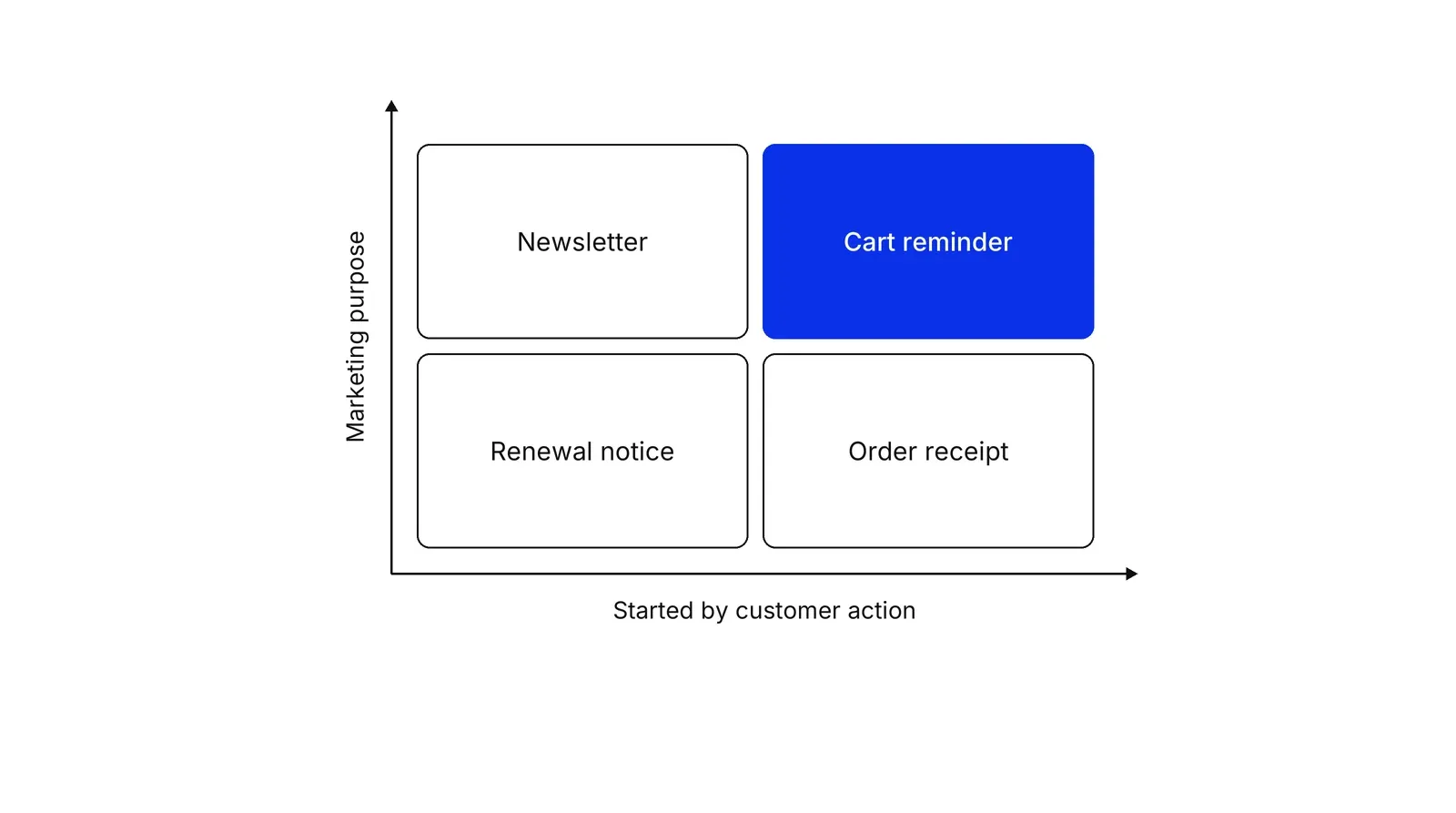
What starts a message defines it, not what it says. The table separates the three types.
| Newsletter | Trigger marketing email | Transactional email | |
|---|---|---|---|
| Starts when | The sender picks a date | The customer acts, or does not | The customer completes a request |
| Example | Monthly product news | Cart reminder, win-back | Receipt, password reset |
| Purpose | Marketing | Marketing | Service |
| One-click unsubscribe (Google) | Required for bulk senders | Required for bulk senders | Exempt |
The last row comes from Google’s sender FAQ, which says one-click unsubscribe applies to marketing and promotional messages and gives password resets and reservation confirmations as transactional examples. A reminder to come back and buy is sent by a machine and is still marketing.
In Nir Eyal’s Hook Model, an email is an external trigger, an outside cue as opposed to an internal trigger of emotion or routine.
The five parts of a flow
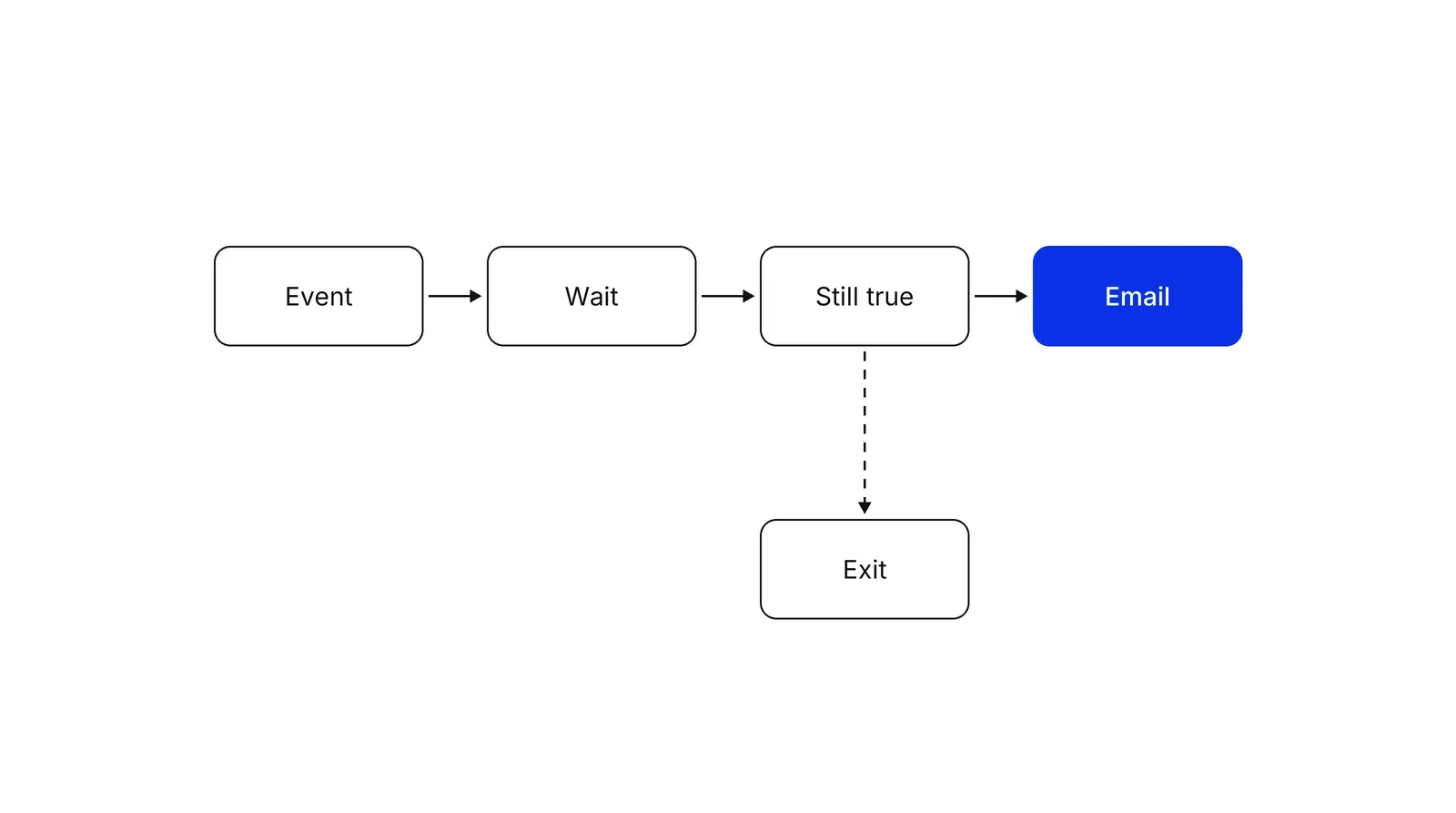
Every trigger flow has the same five parts, whatever the tool calls them.
- Event. The behavior that starts the flow. Klaviyo notes that event variables such as the products left in a cart only exist in flows started by an event, not in flows started by a list or a date.
- Wait. A pause long enough that the person can finish on their own.
- Recheck. A test of what must still be true when the wait ends.
- Email. One message built for the stopped step.
- Exit. The rule that removes people who did the thing. Customer.io lets a person leave on reaching a goal, with a conversion window of up to 90 days, and Braze lets an exception event pull users out.
Two tool behaviors fail quietly. In Customer.io’s event-triggered automations, people enter only when they perform the event after the automation starts, so earlier events do not backfill. And Klaviyo’s Smart Sending skips a marketing email when the person got one within a window, 16 hours by default for email and 24 hours for SMS and push, and does not reschedule the skipped message. A cart reminder can vanish because a newsletter went out that morning.
Braze’s frequency capping applies across all campaigns and Canvas steps on a channel, with up to 10 rules per workspace and windows from minutes to 30 days. Transactional or API-triggered messages bypass the cap only if you opt in, for example with the override_frequency_capping flag.
Pick the behavior, then the person
The email is a prompt. In BJ Fogg’s behavior model, behavior happens when motivation, ability and a prompt come together at the same time. If the step is hard, a prompt does not help, so run a friction audit first.
Choosing who gets the email is a separate question. Eva Ascarza’s 2018 paper in the Journal of Marketing Research, using field data from a wireless provider and a membership organization, found that targeting by how responsive customers are to an intervention cuts churn more than targeting by risk of leaving. A churn-risk trigger sends to people who may leave anyway.
What the evidence shows
The best controlled evidence is narrow. Goic, Rojas and Saavedra ran a field experiment with a multichannel retailer in which about half of browsers who left without buying were randomly sent emails and the rest got none. The emails raised online revenue and revenue in the triggered category. Retargeting based on longer browsing histories and recommending a wider assortment were linked to better results.
Vendor data is broader and less clean. Klaviyo’s benchmark page, drawn from over 183,000 of its ecommerce customers, reports that flows were 5.3 percent of sends and almost 41 percent of email revenue, with a click rate of 5.58 percent against 1.69 percent for campaigns. It also reports that about 48 percent of flow revenue came from new buyers against 16 percent for campaigns, and that flow order rates run from 1.62 percent in clothing and accessories to 2.17 percent in home and garden, against 0.97 to 1.34 percent for campaigns in the same two categories. The page gives no data period. The customers are one platform’s, and revenue follows its attribution. Use incrementality testing to size the real lift.
Opens are a weak measure of either: Apple’s Protect Mail Activity loads remote content in the background whether or not a person engages.
Cart reminders are the usual first flow. Baymard’s list of studies puts average documented cart abandonment at 70.22 percent across 50 studies.
Rules for reaching the inbox
Bulk-sender rules apply by volume. Google defines a bulk sender as one that sends close to 5,000 messages or more a day to personal Gmail accounts, counting all subdomains of a primary domain, and the status does not expire. The table sets Google’s sender guidelines, in force from February 1, 2024, beside Yahoo’s rules, which began a gradual rollout the same month.
| Requirement | Google (bulk senders) | Yahoo (bulk senders) |
|---|---|---|
| Authentication | SPF, DKIM and DMARC, with the From domain aligned; DKIM key of 1024 bits or longer, 2048 recommended | SPF and DKIM, plus DMARC at p=none or stricter, with the From domain aligned |
| Unsubscribe | One-click on marketing mail, plus a visible link in the body | One-click List-Unsubscribe on marketing mail, plus a visible link |
| Processing time | Within 48 hours (sender FAQ) | Within 2 days |
| Spam rate | Below 0.30 percent, ideally below 0.10 percent | Below 0.3 percent |
| Transport and DNS | TLS; valid forward and reverse DNS | Valid forward and reverse DNS; RFCs 5321 and 5322 |
Postmaster Tools measures Google’s spam rate as the share of DKIM-authenticated messages that recipients manually mark as spam in Gmail. Yahoo calculates its rate from mail delivered to the inbox. Non-compliant Gmail mail may be rejected or sent to spam, with a code such as 4.7.27 for an SPF failure, also visible in Postmaster Tools. For per-campaign spam rates, Google points to the Feedback Loop dashboard.
RFC 8058 (2017) defines the mechanism on top of the List-Unsubscribe header from RFC 2369 (1998). The message needs a List-Unsubscribe header with exactly one HTTPS URI and a List-Unsubscribe-Post: List-Unsubscribe=One-Click header, both covered by a valid DKIM signature. The mailbox provider sends an HTTPS POST to that URI, and the sender must not answer with a redirect.
Consent and opt-out, briefly
This is a summary, not legal advice. In the US, the FTC’s CAN-SPAM guide covers all commercial email, including business-to-business, and requires a physical postal address, no deceptive subject lines, honoring an opt-out within 10 business days, and an opt-out mechanism that works for at least 30 days after sending. Penalties reach $53,088 per violating email, and transactional categories are read narrowly.
In the EU, ePrivacy Article 13 allows direct marketing email only with prior consent, with an exception for a seller’s own similar products to existing customers, who must be able to object free of charge at collection and in every message. The GDPR adds that a person may object to direct marketing at any time and that withdrawing consent must be as easy as giving it. The UK regulator’s guidance describes the same soft opt-in, which does not cover prospects. Emails to corporate bodies need no individual consent in the UK, but the ICO still recommends keeping a do-not-email list.
A Growth Lab plan starts from the events a business already logs and the first messages that should follow them: see Growth Lab.
How to apply Trigger and behavioral emails, step by step
- Pick one event and check that it fires. Choose a behavior that signals a next step, such as starting checkout. Compare the event count with your own orders for a week. Result: one named event with the properties the email needs, and a note of how often it is missing.
- Label the message as service or marketing. A receipt or a verification code completes something the customer asked for, so it is a service message. A reminder to come back and buy is marketing. Result: every message carries a label, and marketing ones are checked against consent.
- Write the entry rule, the wait and the recheck. State who enters, how long to wait, and what must still be true when the wait ends. Result: a written rule in the form 'event, wait, still true, send'.
- Write one message with one next step. Name the stopped step in the first line and link straight back to it. Result: a draft with one call to action that opens the exact step the person left.
- Set the exit, the goal and the cap. Exit people when they reach the goal, and cap the marketing messages one person gets in a period. Result: no reminders for things already done.
- Authenticate and add one-click unsubscribe. Set SPF, DKIM and DMARC, add the RFC 8058 headers to marketing messages, and put a visible unsubscribe link in the body. Result: a test message that passes authentication in the headers view.
- Hold out a control group and measure. Keep a random share of eligible people out of the flow and compare orders between groups. Result: a lift figure that does not depend on platform attribution.
Examples
An online store: the cart reminder
Illustrative. A store logs 'checkout started'. The flow waits a few hours, rechecks that there is no order, and sends one email with the cart contents and one link. Same-morning newsletters make Klaviyo's Smart Sending skip some reminders, so the store moves newsletters off busy cart days.
A payments app: the stalled verification
Illustrative. A fintech app logs 'identity check started' and 'identity check passed'. If the second does not follow within a day, the person gets photo tips and a link back to the step. The check stays, since regulation requires it.
A clinic: the booking follow-up
Illustrative. A clinic site logs 'booking form submitted'. A confirmation goes out at once as a service message. If no time is confirmed within a set number of hours, the patient gets a status email. Neither names a condition or treatment, since inbox previews are visible.
When to use it
Use it when you already log a behavior that predicts a next step, such as an abandoned checkout, a stalled onboarding or a lapsed customer, and enough events arrive each week to feed a flow.
When not to use it
Skip it when event data is unreliable, since a wrong trigger sends the wrong message to a real person. Skip marketing triggers for people who have not consented where consent is required. Fix a broken checkout or form first.
Common mistakes
- Not rechecking before sending. The person has bought during the wait, and the reminder arrives anyway.
- Using opens as the trigger. Apple's Protect Mail Activity fetches content in the background, so an 'opened' event can fire with no human involved. Use clicks and product events.
- Treating every automated message as transactional. Google's one-click exemption covers transactional mail, and a 'come back and buy' reminder is marketing.
- Stacking flows with no shared cap. One person can start a welcome, a cart and a browse flow in the same hour.
- Judging the flow by platform revenue alone. Attribution counts purchases that might have happened anyway.
FAQ
What is a trigger email?
A trigger email is an automated message sent when a customer does, or fails to do, something your system records, such as abandoning a cart. It follows behavior instead of a send date. Other names are behavioral, event-based and lifecycle emails.
What is the difference between trigger emails and transactional emails?
Transactional emails complete something the customer asked for, like a receipt. Trigger emails are started by behavior and are often marketing, like a cart reminder. The label matters: Google exempts transactional mail from one-click unsubscribe, and the FTC reads transactional categories narrowly.
Do trigger emails need an unsubscribe link?
If they are marketing, yes. Google and Yahoo require one-click unsubscribe from bulk senders, CAN-SPAM requires a working opt-out, and under GDPR Article 21 a person can object to direct marketing at any time.
Do trigger emails perform better than newsletters?
On Klaviyo's 2026 benchmark page, flows had a 5.58 percent click rate against 1.69 percent for campaigns, and made about 41 percent of email revenue from 5.3 percent of sends. These are one vendor's ecommerce customers, so test in your own business.
Sources
- Google, Email sender guidelines, Google Workspace Admin Help
- Google, Email sender guidelines FAQ, Google Workspace Admin Help
- Google, Postmaster Tools dashboards, Gmail Help
- Yahoo, Sender Hub: Sender best practices
- J. Levine and T. Herkula, RFC 8058: Signaling One-Click Functionality for List Email Headers, IETF, 2017
- G. Neufeld and J. Baer, RFC 2369: The Use of URLs as Meta-Syntax for Core Mail List Commands, IETF, 1998
- Federal Trade Commission, CAN-SPAM Act: A Compliance Guide for Business
- European Union, Directive 2002/58/EC (ePrivacy), Article 13
- European Union, Regulation (EU) 2016/679 (GDPR), Articles 7 and 21
- UK Information Commissioner's Office, Electronic mail marketing
- Apple, Mail Privacy Protection and privacy
- Klaviyo, Email marketing benchmarks by industry, 2026
- Klaviyo, Understand Smart Sending in Klaviyo, Help Center
- Klaviyo, Add event variables to flow messages, Help Center
- Customer.io, Campaign concepts and settings
- Customer.io, Automation goals and conversion criteria
- Braze, Exit criteria for Canvas
- Braze, Rate limiting and frequency capping
- Marcel Goic, Andrea Rojas, Ignacio Saavedra, The Effectiveness of Triggered Email Marketing in Addressing Browse Abandonments, Journal of Interactive Marketing 55, 2021
- Eva Ascarza, Retention Futility: Targeting High-Risk Customers Might Be Ineffective, Journal of Marketing Research 55(1), 2018
- BJ Fogg, Fogg Behavior Model, behaviormodel.org
- Nir Eyal, How to Manufacture Desire, nirandfar.com
- Baymard Institute, Cart Abandonment Rate Statistics
Last updated Oct 9, 2026


Marketing agency or growth system: when a company outgrows its agency
An agency is the right call while the founder still runs most of the company. Once the business starts copying itself into new locations or markets, it needs a system that sets goals, tests hypotheses and owns the result.

Why healthcare marketing agencies stall: the short, mid and long wins model we use with clinics
Most agencies own the click and nobody owns the front desk. How we structure clinic work in three horizons, the research behind each one, and one year of results.

Why channel tests stall after month three
Most paid channel tests do not end with a decision. They end when the budget runs out, the attribution model changes, or everyone quietly stops looking at the dashboard.