Technical SEO
Technical SEO is the work that lets search engines find, render and index a site's pages and pick the right URL for each, so the content you publish can compete in results at all.
Technical SEO is the part of search optimization that makes a website crawlable, renderable and indexable: robots.txt, noindex, canonical tags, redirects and status codes, XML sitemaps, hreflang for language versions, and page speed measured as Core Web Vitals. It answers one question first: can Google Search and Yandex read this page and store the right version of it? Content and links only count once the answer is yes.
- Origin
- Practitioner discipline with no single inventor, built on search engine documentation and the Robots Exclusion Protocol (Martijn Koster), 1994 for robots.txt; standardized as RFC 9309 in 2022
- Level
- 201 · Tool
- Fits
- Startup, Small and mid-size, Scale-up
- Time to apply
- one to two days for a first audit of a small site; a week or more for a large or JavaScript-heavy one
- What you need
- verified access to Google Search Console and Yandex Webmaster · a crawler that fetches the site the way a bot does · one developer who can change templates, headers and server rules · a list of the pages that make money or bring leads
Technical SEO is the work that makes a website readable for search engines: the crawler can reach each page, render it, store it in the index and pick the right URL for it. Nobody invented it. It grew out of the rules search engines publish, and the oldest of those rules is robots.txt, which RFC 9309 traces to Martijn Koster in 1994 and which the IETF turned into a formal standard in 2022. Founders meet technical SEO after a redesign that lost half the traffic. Marketing teams meet it when 40 new articles sit in Google Search Console as “Crawled - currently not indexed” three months after launch.
How does a page get from your server into search results?
A page passes through 4 stages, and technical SEO owns the first 3. Google Search Central describes 3 stages: crawling, indexing and serving results. Between crawling and indexing sits rendering, when Googlebot runs the page’s JavaScript in a recent version of Chrome. The same document adds that Google doesn’t guarantee it will crawl, index or serve any page.
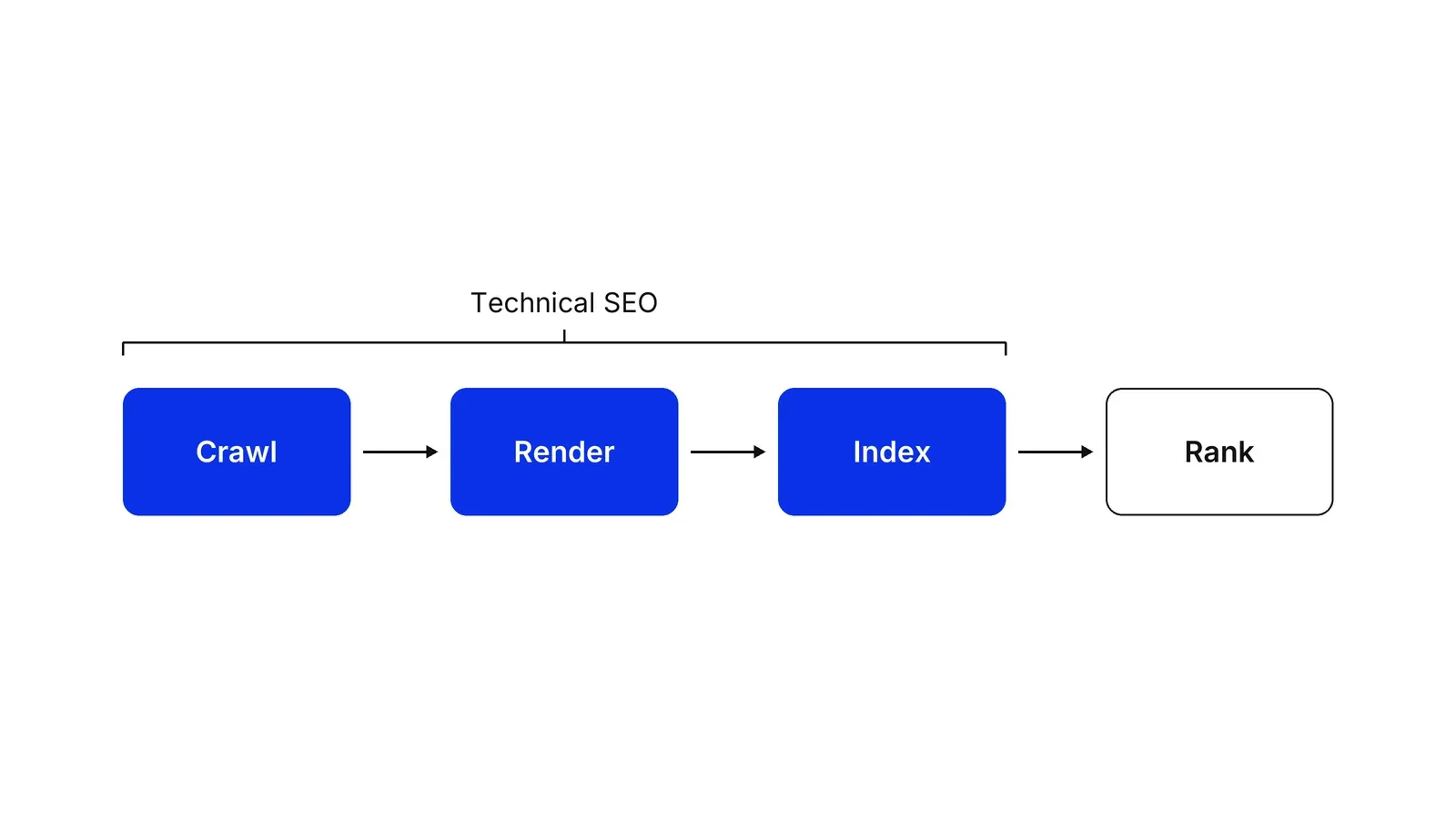
Each stage fails in its own way. A crawl fails when robots.txt blocks a section or the server answers with errors. Rendering fails when the main text only appears after scripts that the bot does not run. Indexing fails when the engine decides the page duplicates another URL or carries too little content. Ranking is where content, links and relevance decide the order, and it only starts for pages that made it through.
The Page indexing report in Search Console shows where your pages stopped. Its advice for audits: “Don’t expect every URL on your site to be indexed.” The goal is that the pages you need are in, and the duplicates are out.
Crawling: robots.txt, status codes and crawl budget
Crawling is the bot downloading your pages, and robots.txt is the file that tells it where it may go. Google’s robots.txt guide says the file manages crawler traffic and is “not a mechanism for keeping a web page out of Google.” RFC 9309 says the same in standards language: the rules are not a form of access authorization. It also asks crawlers to parse at least 500 KiB of the file and not to use a cached copy for more than 24 hours. The Web Almanac 2024 found that 83.5% of desktop sites return a robots.txt file with status 200.
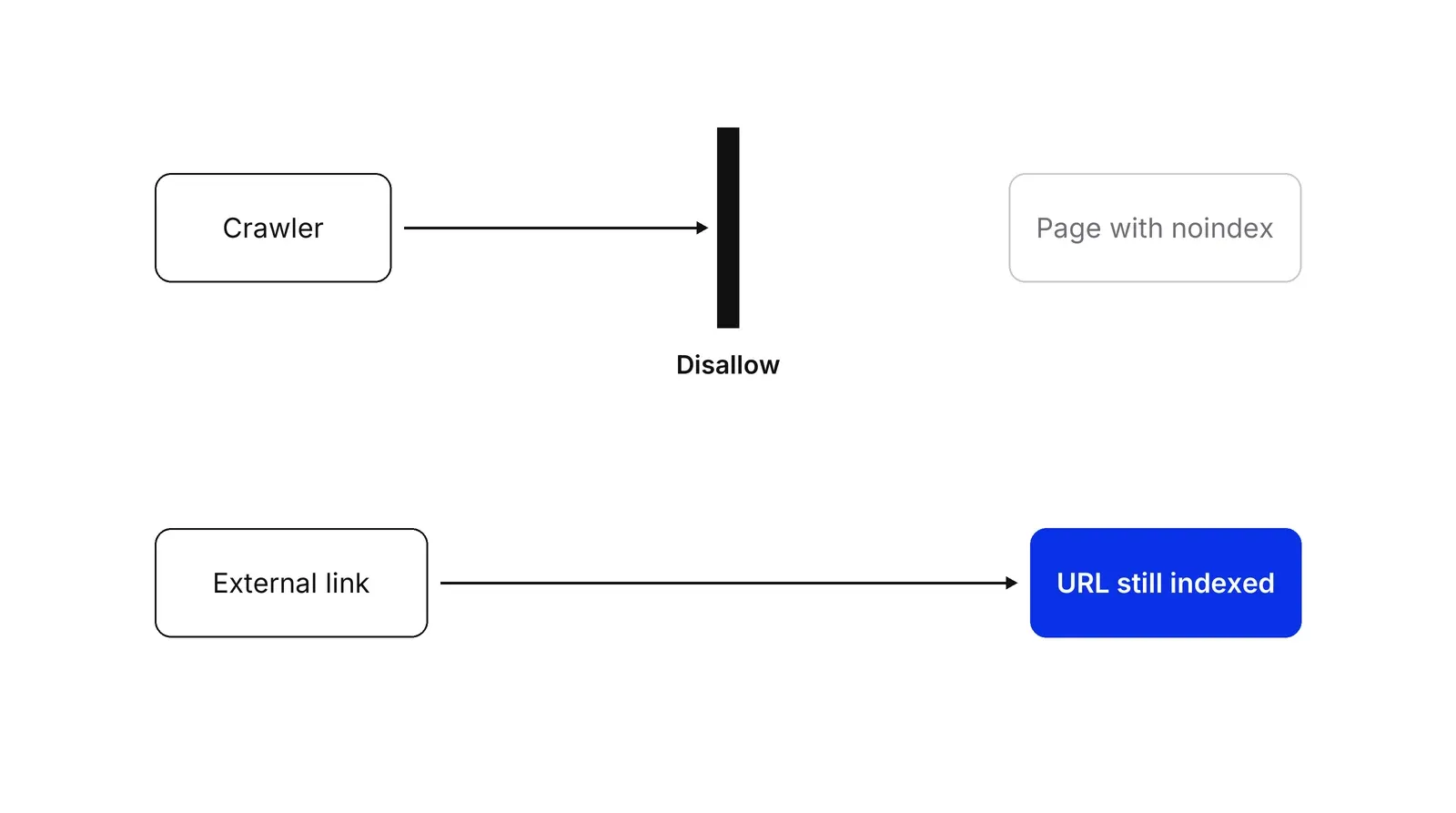
The trap that costs sites the most is blocking a page in robots.txt and adding noindex to it at the same time. The bot is not allowed to fetch the page, so it never reads the noindex. If another site links to the URL, the address can still be indexed, usually without a description. Google’s noindex guide says the page “must not be blocked by a robots.txt file” for the rule to work, and Yandex’s robots.txt help gives the same instruction. The rule is in wide use: the Web Almanac 2024 found noindex on 4.7% of desktop pages and 3.9% of mobile pages.
Status codes tell the bot what happened. According to Google’s status code guide, crawlers follow up to 10 redirect hops, pages that return 4xx drop out of the index over time, and repeated 5xx errors slow crawling and eventually remove pages. A 429 “too many requests” is treated as a server error. Use a permanent 301 or 308 when a URL moves for good; Google shows the target of a permanent redirect in results and the source of a temporary one.
Crawl budget matters less than people think. Google’s crawl budget guide is written for sites with roughly a million pages that change weekly, or 10,000 pages that change daily. A 200-page company site rarely needs it; its Page indexing report in Google Search Console is the better place to look.
Indexing: canonicals, duplicates and sitemaps
A canonical URL is the one address a search engine keeps for a group of duplicate pages. Filters, sorting, UTM tags and session IDs turn one page into dozens of URLs: a category with 5 filters of 4 values each has 3,125 possible filter combinations. The engine has to choose one address. You can steer that choice. Google ranks the signals by strength in its canonical guide: redirects and rel=“canonical” are strong, inclusion in a sitemap is weak. It also warns: “Don’t use the robots.txt file for canonicalization purposes.”
The HTTP Archive Web Almanac 2024 found canonical tags on 69% of desktop pages and 65% of mobile pages, so most sites already send this signal. Whether it is consistent with the sitemap and internal links is another question, and that is what an audit checks.
An XML sitemap is a list of the URLs you want indexed. Google caps each file at 50,000 URLs or 50 MB uncompressed, ignores the priority and changefreq fields, and uses lastmod only when it is consistently accurate, per its sitemap guide. List only canonical pages that return 200. A sitemap full of redirects teaches the engine to distrust it.
Rendering and mobile content
Rendering is the step where a bot runs your JavaScript to see the finished page. Google Search puts pages in a render queue and processes them later, and its JavaScript SEO guide recommends server-side rendering or pre-rendering because not all bots run scripts. It also says Google follows only links written as <a> elements with an href.
Yandex lets you choose. Its JavaScript rendering setting defaults to “At the bot’s discretion,” and Yandex suggests turning rendering off when the site already uses server-side rendering, to save server load.
Google Search indexes the mobile version of a site, crawled with Googlebot Smartphone. Its mobile-first indexing guide asks for the same content, structured data, titles and descriptions on mobile and desktop.
Language versions: hreflang
hreflang is an annotation that tells search engines which page is the version for which language or country. Google accepts it in HTML, HTTP headers or the sitemap, and its localization guide sets two rules that break most setups: each version must list itself, and if two pages do not point to each other, the tags are ignored. Only about 10% of desktop sites and 9% of mobile sites use hreflang at all, according to the Web Almanac 2024.
Core Web Vitals
Core Web Vitals are three speed and stability metrics measured on real visits. The web.dev targets are Largest Contentful Paint within 2.5 seconds, Interaction to Next Paint of 200 milliseconds or less, and Cumulative Layout Shift of 0.1 or less, assessed at the 75th percentile of page loads. INP replaced First Input Delay on 12 March 2024.
Google’s page experience page says “Core Web Vitals are used by our ranking systems,” and also that good scores do not guarantee top positions. The Web Almanac 2024 counted 54% of desktop sites and 48% of mobile sites passing all three. Treat speed as a tie-breaker between relevant pages and as a conversion problem in its own right.
Google and Yandex: where the rules differ
A site with traffic from both engines has to handle a few differences.
| Topic | Yandex | |
|---|---|---|
| Canonical tag | A strong signal, not a command | A recommendation, ignored if it points to another domain or forms a chain |
| robots.txt size | Parsers must read at least 500 KiB, per RFC 9309 | Up to 500 KB; a larger or broken file means the site is treated as open |
| URL parameters | Handled with canonicals and robots.txt | Clean-param in robots.txt drops UTM and session parameters |
| hreflang in the sitemap | Supported | No longer supported; use tags in the page head |
| Faster recrawl | URL Inspection, with a daily request limit | Reindex pages tool, Metrica tag crawling and IndexNow |
| JavaScript | Queues pages that return 200 for rendering | Rendering is a setting you can switch off |
Yandex says indexing may take 3 to 7 days after a recrawl request. IndexNow is also used by Bing, Naver, Seznam.cz and Yep, according to indexnow.org; Google is not on that list.
In our Growth Lab work a technical audit comes before any content plan, because content written for pages that cannot be indexed is spent money.
How to apply Technical SEO, step by step
- List the pages that must rank. Write down the page types that matter: service pages, product or doctor pages, category pages, articles. Note the expected count of each, for example 300 services, 60 doctors and 120 articles. A site with 300 services that shows 4,000 indexed URLs has a duplicate problem before you open a single report. Result: a target list and the number of URLs you expect search engines to hold.
- Check what the engines already see. Open the Page indexing report in Google Search Console and the indexing reports in Yandex Webmaster. Group the excluded URLs by reason: blocked by robots.txt, noindex, duplicate with a different canonical, crawled but not indexed, soft 404, server errors. Inspect your 5 to 10 most valuable URLs with the URL Inspection tool in Google Search Console. Result: a list of the gaps between your target list and what is indexed.
- Crawl the site like a bot. Run a crawler such as Screaming Frog SEO Spider over the whole site and over the sitemap, once as Googlebot Smartphone and once as a desktop bot. Record status codes, redirect chains, canonical tags, noindex rules, orphan pages with no internal links, and pages whose main content only appears after JavaScript runs. Result: one spreadsheet with a row per URL and the problems found on it.
- Fix access and duplicates first. Unblock important sections in robots.txt, move noindex to the pages that should stay out, point every duplicate to one canonical URL, replace chains of 2 or more redirects with a single 301, and return 404 or 410 for pages that are gone. Clean the sitemap so it lists only canonical, indexable URLs that return 200. Result: every target page is reachable, indexable and has one address.
- Fix rendering, language versions and speed. Make sure the main content and links are in the HTML the server sends, or confirm that both engines render them. Add hreflang with return links if you have language or country versions. Check Core Web Vitals field data in the Chrome UX Report or Google Search Console for the main templates and fix the worst template first. Result: a template-level task list for developers, ranked by the traffic each template carries.
- Monitor and recheck monthly. Resubmit the sitemap after big changes, send key URLs to the Reindex pages tool in Yandex Webmaster, and recheck both indexing reports 30 days later. Set an alert for spikes in 5xx errors and for a robots.txt file that suddenly blocks everything. Result: a monthly one-page check that catches regressions after releases.
Examples
A clinic site with filter duplicates
Illustrative. A private clinic lists 60 doctors. The doctor directory can be filtered by specialty, district and insurance, and each filter combination creates a new URL, so the crawler finds about 2,400 addresses for 60 real pages. That is 40 URLs per doctor. The team adds a canonical tag from every filtered view to the plain doctor list, adds a Clean-param line for the 3 filter parameters and the UTM tags for Yandex, and removes filtered URLs from the sitemap. The sitemap now holds 60 doctor pages plus service pages, which is the set they want indexed.
A fintech landing built as a single-page app
Illustrative. A payments startup ships its marketing site as a client-side app. The server returns an almost empty HTML shell, navigation uses click handlers instead of links, and every unknown path returns 200 with a 'page not found' message. The fix is server-side rendering for the marketing pages, real a href links between them, and a true 404 status for missing paths. Because the HTML now arrives complete, the team sets the JavaScript page rendering option in Yandex Webmaster to off, as Yandex Help suggests for sites with server-side rendering.
A site with English and Russian versions
Illustrative. A SaaS company runs /en/ and /ru/ versions of 120 pages. The Russian pages carry hreflang tags, the English ones do not, so the annotations are ignored for lack of return links. The developer adds a full set of hreflang links in the page head of every version, each page listing itself, its pair and an x-default: 3 link tags per page, 360 across the site. Head tags are used instead of the sitemap because Yandex no longer reads language versions from sitemaps.
When to use it
Run it when you launch or migrate a site, change the CMS or front-end framework, move to a new domain or to HTTPS, add language versions, or see traffic fall while content has not changed. Run a light 1-hour version every month on any site that earns leads or sales from search, and a full audit before investing in content or links.
When not to use it
Do not expect technical work to make weak pages rank: once a page is crawled and indexed, relevance and quality decide its position. On a 10-page brochure site with clean indexing reports, a long audit is wasted time; check indexing, speed on mobile and the sitemap, then spend the effort on content. Do not chase a perfect score from an audit tool when Search Console and Yandex Webmaster show no real problems.
Common mistakes
- Blocking a page in robots.txt to remove it from search. Both Google and Yandex can still index a blocked URL from links, and the bot never sees a noindex tag on a page it may not fetch.
- Sending mixed signals: a canonical tag that points to one URL, a sitemap that lists another and internal links to a third. Search engines then choose for you.
- Listing redirected, noindexed or 404 URLs in the sitemap. The sitemap should contain only canonical pages that return 200.
- Using noindex to save crawl budget. Google still requests those pages; robots.txt and fewer duplicate URLs save crawling.
- Judging speed by a single lab test on a fast laptop. Core Web Vitals are assessed on field data at the 75th percentile, on mobile and desktop separately.
FAQ
What does a technical SEO audit include?
A technical SEO audit checks whether search engines can crawl, render and index the pages that matter. It covers robots.txt, noindex rules, canonicals, redirects and status codes, the XML sitemap, internal links, JavaScript rendering, hreflang, mobile content and Core Web Vitals, and it ends with a ranked task list for developers.
What goes into a technical SEO brief for developers?
Each task names the URL pattern or template, the current behaviour, the required behaviour and how to check it, for example: filtered catalog URLs return 200 and no canonical; they should carry a canonical to the main category; check with URL Inspection. Rank tasks by the traffic each template carries.
What is the difference between technical SEO and on-page SEO?
Technical SEO decides whether a page can be found, rendered and indexed and which URL represents it. On-page SEO works on what the indexed page says: titles, headings, text, images and internal anchor text. A page with perfect on-page work still earns nothing if it is blocked, duplicated or returns the wrong status code.
Does robots.txt keep a page out of Google and Yandex?
No. robots.txt controls crawling, not indexing. Google Search Central says a disallowed URL can still be indexed if other pages link to it, and Yandex Webmaster Help says pages restricted in robots.txt can take part in search. To keep a page out, let it be crawled and add a noindex meta tag or X-Robots-Tag header.
Do Core Web Vitals affect rankings?
Google says Core Web Vitals are used by its ranking systems, and that good scores do not guarantee top positions because relevance comes first. The targets are LCP within 2.5 seconds, INP under 200 milliseconds and CLS under 0.1, measured on real visits at the 75th percentile.
Sources
- Google Search Central, In-depth guide to how Google Search works
- Google Search Central, SEO Starter Guide
- Google Search Central, Introduction to robots.txt
- Google Search Central, Block search indexing with noindex
- Google Search Central, How to specify a canonical URL
- Google Search Central, Build and submit a sitemap
- Google Search Central, Tell Google about localized versions of your page
- Google Search Central, Understand JavaScript SEO basics
- Google Search Central, Crawl budget management for large sites
- Google Search Central, Understanding Core Web Vitals and Google search results
- Google Search Central, Understanding page experience in Google Search results
- Google Search Central, Mobile-first indexing best practices
- Google Search Central, How HTTP status codes and network errors affect Google Search
- Google Search Central, Redirects and Google Search
- Google Search Console Help, Page indexing report
- Google Search Console Help, URL Inspection tool
- web.dev, Web Vitals
- web.dev, Rick Viscomi, Interaction to Next Paint becomes a Core Web Vital on March 12
- IETF, RFC 9309: Robots Exclusion Protocol (Koster, Illyes, Zeller, Sassman, 2022)
- sitemaps.org, Sitemaps XML format
- Yandex Webmaster Help, Using robots.txt
- Yandex Webmaster Help, Clean-param directive
- Yandex Webmaster Help, Canonical URLs
- Yandex Webmaster Help, Indexing localized pages
- Yandex Webmaster Help, Indexing pages with JavaScript
- Yandex Webmaster Help, IndexNow protocol support
- Yandex Webmaster Help, How do I notify Yandex about new and updated pages
- IndexNow.org, IndexNow protocol
- HTTP Archive, Web Almanac 2024: SEO chapter
Last updated Oct 9, 2026


The compliance layer under fintech marketing operations
A fintech marketing agency can build campaigns. It cannot own the compliance review, the KYC drop-off or the multi-market licensing rules that decide whether a lead ever becomes a customer.

Fractional CMO: what you get, and what has to exist underneath
A fractional CMO brings strategy and judgment. Without reporting, CRM hygiene and a named owner per number, the engagement produces a slide deck instead of a system.

The operations layer behind healthcare patient acquisition
Ads and search bring the request in. What happens between the click and the booked, attended visit decides whether the spend paid off.